
Last updated: August 2026
A pillar page is a comprehensive resource covering a broad topic that links to related subtopic pages, forming the hub of a topic cluster. Two worked examples appear below — a GEO content cluster and an e-commerce cluster built in two phases — audience intent research first, Search Console data later, one of whose cluster pages went on to earn three citations in a single Google AI Overview. Both are shown with their full structure rather than described in the abstract.
Most pillar page guides illustrate the concept with the same handful of enterprise examples — Moz’s Beginner’s Guide, HubSpot’s marketing hub — built by teams with resources most readers don’t have. The two examples here are small: one is this site, the other is a four-month-old Shopify store I designed, built and launched. That makes them more useful as models, because you can see the whole structure and the reasoning behind each cluster page.
Key Takeaways
- A pillar page is a comprehensive guide on a core topic that links out to cluster content — forming the hub of a topic cluster strategy.
- Two documented examples are shown below with their complete cluster structure, including how each supporting page was chosen.
- Cluster pages come from different sources depending on the site’s age: audience intent research when there is no search history yet, Search Console query data once impressions accumulate.
- Pillar pages build topical authority, enhance internal linking architecture, and support the E-E-A-T signals search engines use to evaluate site quality.
- HubSpot research puts the organic traffic uplift from topic clusters at around 43%; Zyppy’s analysis of 23 million links found URLs with 40–44 internal links receive 4x more clicks than pages with fewer than 5.
- Three types of pillar page exist: the “Ultimate Guide” format, “What Is” definitional pages, and “How To” instructional resources.
This post contains affiliate links. If you make a purchase through them, I may earn a small commission at no extra cost to you. Thanks for your support!
Pillar Page Examples: Two Real Topic Clusters
A pillar page example is best understood by looking at the hub and every spoke together. Below are two clusters I built and maintain: one covering Generative Engine Optimization on this site, and one for an e-commerce store built from zero, where the supporting pages were selected first from audience intent research and later expanded using Search Console data. Each shows the pillar, the cluster pages, and the reasoning behind the selection.
Example 1: A GEO Content Cluster (svetlanasosnova.com)
This is an “Ultimate Guide” format pillar covering a broad, fast-moving discipline. The pillar defines the field and links to cluster pages that each own one sub-question in depth.
Pillar
Generative Engine Optimization (GEO): The Complete Guide
Defines the discipline, sets out the implementation framework, and routes readers to the specific answer they came for.
Cluster pages
- GEO vs SEO vs AEO — owns the comparison question
- AEO vs GEO: Where They Actually Diverge — owns the narrower two-way distinction
- Google AI Overview Citations: A Case Study — owns the proof
- Online Presence Management — owns the wider strategic frame
- Search Experience Optimization (SXO) — owns the user-experience overlap
- Programmatic SEO — owns scaling across large catalogs
The rule I apply: every cluster page must own exactly one question that the pillar deliberately does not answer in full. If two pages could both credibly answer the same query, one of them is redundant and should be merged. The pillar links down to each; each links back up.
Worth being honest about what this cluster does and doesn’t achieve. It has real value for credibility and AI citation, but the head terms in this space require hundreds of referring domains, so it is not primarily a traffic play for a low-authority domain. A cluster can be doing its job without being your traffic engine — which is a distinction worth making before you build one.
Example 2: An E-Commerce Cluster Built in Two Phases (Bee Pontoons)
This is the more instructive example, because I built the site and the cluster from scratch. The storefront launched in February 2026 with no content, no backlinks and no search history — which meant there was no Search Console data to mine. Every cluster page was a deliberate choice rather than an optimisation of something inherited.
Phase one: audience intent research. With no query data of my own, I used AnswerThePublic to surface what people were actually asking around bee watering — not to find keywords by volume, but to identify pain points. “Are DIY bee watering stations safe” is a worry, not a search term. Each cluster page addresses one of those worries, in a context where the product could legitimately appear as part of the answer rather than being bolted on.
Phase two: Search Console, once there was something to read. As impressions accumulated over the following months, real queries started appearing in GSC — including phrasings the intent research hadn’t surfaced. Those went back into the cluster. This is the part most cluster guides skip: the first version is inference, and the second version is evidence. You don’t get to start with evidence on a new domain.
Built while I was Senior Digital Marketing Specialist at Trimyxs LLC, the parent company.
Pillar
The Complete Bee Watering Station Guide
Covers the category end to end for someone who has just realised the problem exists.
Cluster pages — mapped from long-tail intent research, later expanded with Search Console data
- How to stop bees drowning in a bird bath — problem-aware, pre-purchase
- Are DIY bee watering stations safe? — the objection, answered with a comparison
- Sugar water for bees: recipe — adjacent intent, brings in a wider audience
- Where to place a bee watering station — post-purchase, and reduces returns
- How to keep bees away from a bird bath — the opposite intent, deliberately covered
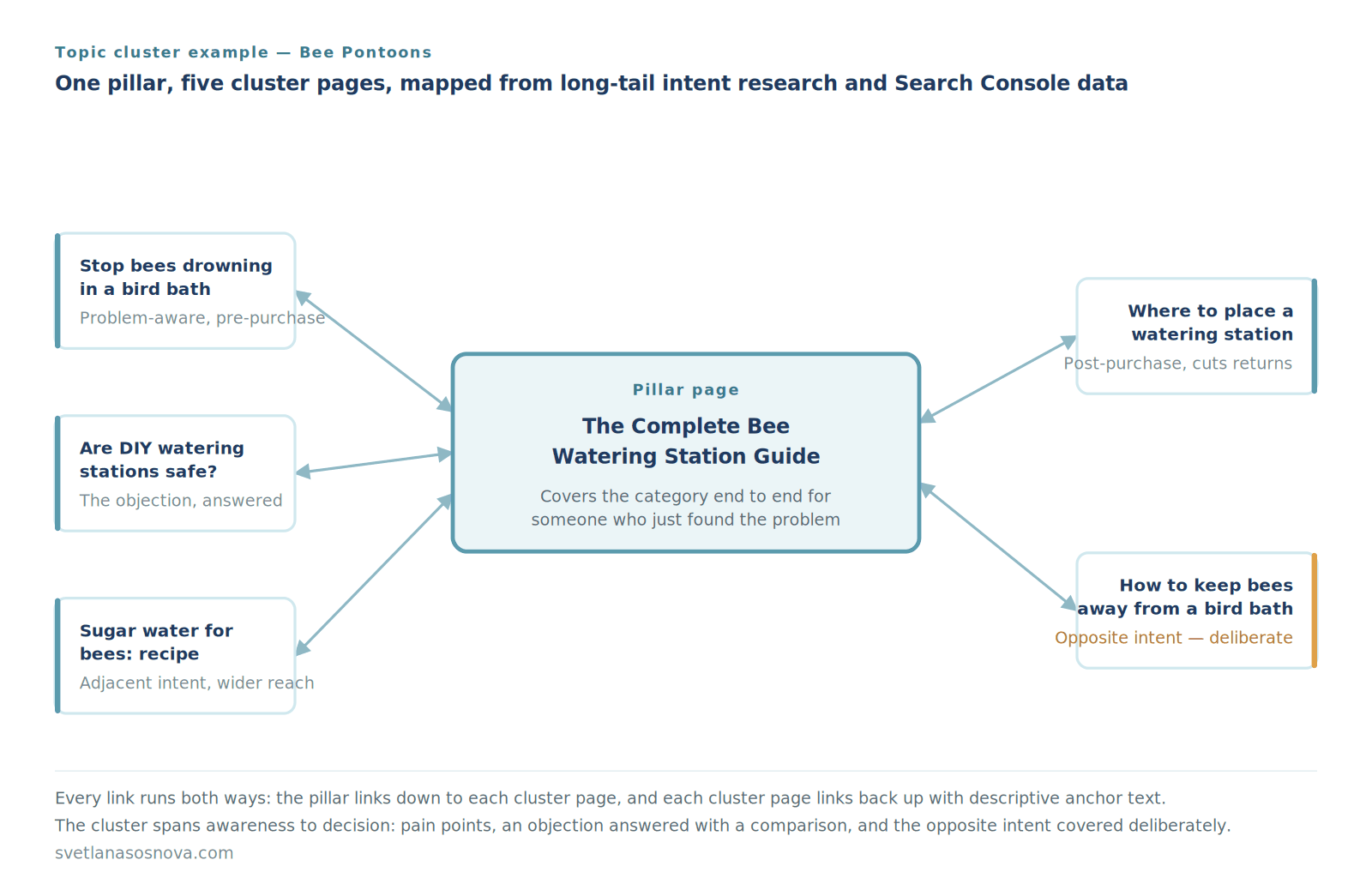
Two things about this selection are worth copying. First, the cluster covers opposing intents — one page helps people attract bees, another helps people keep bees away. Both are real queries in the same semantic space, and covering both widens the range of sub-questions the cluster can answer.
Second, the cluster spans the full journey rather than stopping at education. The DIY safety page tackles the objection to buying anything at all, and it does so as a direct comparison — sticks and stones against a purpose-built station — concluding with a recommendation. That is decision-stage content sitting inside an informational cluster, and it belongs there. Research on topic clusters consistently finds that effective clusters address the full spectrum of concerns, from awareness-stage education through to decision-stage comparison. A cluster that only educates leaves the buying question to someone else’s page.
One cluster page from this set — “how to stop bees drowning in bird bath” — went on to earn three separate in-text citations in a single Google AI Overview, on a domain four months old with no backlinks. The full implementation, including what that single case can and cannot prove, is documented in the Google AI Overview case study. Several elements were deployed together, so the cluster structure is one plausible contributor among others rather than an isolated cause.
What the Two Examples Have in Common
- Every page earns its place — but more pages is better, not worse. Both clusters here sit at five to six pages, which is the small end of the working range. Published guidance generally puts effective clusters at 8–20 cluster pages per pillar, and the failure mode is thin pages, not many pages. Treat a small cluster as a starting position to expand from, not a finished state.
- One question per page, no overlap. If two cluster pages compete for the same query, they compete with each other. Merge them.
- Bidirectional linking. Pillar links down to every cluster page; every cluster page links back up with descriptive anchor text.
- Sourced from long-tail intent research, then refined with data. Start with what your audience worries about — tools like AnswerThePublic surface this before you have any traffic. Once Search Console impressions accumulate, feed the real phrasings back in. Inference first, evidence second.
- Cover the topic and the journey. Objections, opposing intents and comparison content all belong in the same cluster. Topical coverage and funnel coverage are not competing goals — a cluster that spans awareness through decision answers more of the sub-questions a search or an AI engine will fan out into.
A Note From Practice — Where Cluster Pages Come From
The question I get asked most is where cluster pages actually come from. My answer depends on whether the site has data yet.
If the site has search history, start in Search Console. Filter to queries with impressions but few or no clicks, then read them for intent rather than volume. That is where the Bee Pontoons cluster came from — “are DIY bee watering stations safe” appeared as a real question people were asking before buying anything, so it became a page. Confirmed demand beats estimated demand every time.
If the site is new, you have no impressions to mine, so you are inferring instead. I start with audience intent research — AnswerThePublic is the tool I reach for, not to rank keywords by volume but to surface the questions and worries behind a topic. “Are DIY bee watering stations safe” is a concern, not a search term, and concerns make better cluster pages than keywords do. Alongside that, People Also Ask, related searches, and querying AI Mode directly to see which sources it pulls each give a partial view of how a query expands into sub-questions. All of it is inference rather than data, and I label it that way in a client deliverable.
Then you go back and do it again. Once a new site accumulates impressions, real phrasings appear in Search Console that the intent research never surfaced. Those go back into the cluster. The first version of a cluster is a hypothesis; the second is evidence.
A tool like InLinks is useful for mapping the cluster and automating the internal linking once those decisions are made — but it will not make them for you. The judgement about which questions deserve their own page stays manual.
On how many pages: more, generally. Published guidance puts effective clusters at roughly 8–20 pages per pillar, and the failure mode is thin pages rather than numerous ones. Cover the awareness questions, the objections, the comparisons and the post-purchase questions — a cluster that spans the whole journey answers more of the sub-questions a search engine or an AI system fans out into. The clusters shown above sit at five and six pages; both are still expanding.
Either way, the filter is the same: can this site realistically rank for it right now? A page targeting a term your domain cannot reach is not a cluster page, it is a placeholder.
What Is a Pillar Page?
A pillar page is a comprehensive, authoritative resource that covers a broad core topic in depth and links out to more specific cluster pages — each exploring a related subtopic in detail. Together, the pillar page and its cluster content form a topic cluster: a content architecture that signals topical authority to search engines and makes it easier for both users and crawlers to navigate related content.
I view a pillar page as the central hub of information on a website — like a main category in a well-organized library. From this central hub, I link to more specific articles. Think of it as an extensive FAQ. Each article explores a related subtopic and gives my audience options to dive deeper.
A content cluster is a group of pages and posts focused on a particular topic. It has one page where the main topic is explained, also known as a pillar page, and loads of other pages on more specific parts of that topic.
— Yoast BV
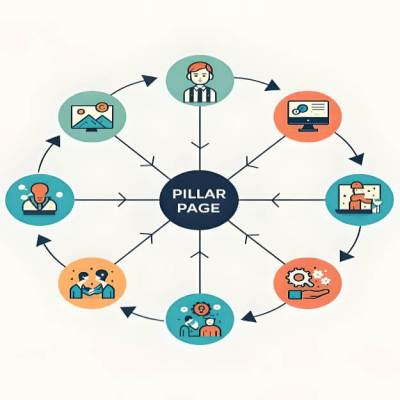
Linking supporting pieces to my main pillar page creates an easy-to-navigate network of information for customers and search engines. This structure supports rankings, builds trust, and attracts more business. The same content architecture also strengthens your online presence management strategy — connecting your site’s content depth to overall brand discoverability across search and AI engines.
What Are the Types of Pillar Pages?
There are three main types of pillar pages: the “Ultimate Guide” (a comprehensive, evergreen resource covering every major facet of a broad topic), the “What Is” page (a definitional resource that clearly explains a concept and links to related sub-topics), and the “How To” page (a step-by-step instructional guide organized around process and implementation). The right format depends on your audience’s primary intent — learning, understanding, or doing.
- Ultimate Guide format: The most comprehensive type — covers an entire topic area from definition through advanced tactics. Best for broad, high-competition topics where depth signals authority. The GEO cluster above uses this format.
- “What Is” format: Definitional and educational — answers a core concept question and links to subtopic exploration pages. Best for audiences new to a topic (e.g., “What Is a Pillar Page?”).
- “How To” format: Action-oriented and process-driven — walks through creation or implementation steps. Best for commercial-intent audiences ready to build something. The Bee Pontoons cluster above uses this format.
How Do Pillar Pages Benefit SEO?
Pillar pages benefit SEO by building topical authority, strengthening internal linking architecture, improving user experience, and targeting a wider range of relevant keywords from a single, comprehensive content hub. When paired with properly structured cluster content, pillar pages signal to Google that a site comprehensively covers a subject — one of the strongest signals for ranking in competitive keyword clusters.
- Builds Topical Authority: Pillar pages establish expertise by showcasing deep knowledge on a core topic — the kind of comprehensive coverage Google’s Helpful Content system evaluates.
- Improves User Experience: Pillar pages centralize related information, simplifying navigation and giving readers a clear route to the specific answer they need.
- Targets a Wider Range of Keywords: By covering a broad topic, you address various relevant queries — increasing your chances of appearing across different related searches.
- Enhances Internal Linking: Pillar pages naturally link to cluster content, helping search engines understand your site’s hierarchy and distribute ranking power. Zyppy’s analysis of 23 million links found URLs with 40–44 internal links receive 4x more clicks than pages with fewer than 5.
- Drives Long-Term Organic Traffic: Pillar pages are evergreen — they remain relevant and useful, continuing to attract visitors months or years after publication, provided they are kept current.
Pillar pages help to build trust with users and search engines and assist in building your website’s E-E-A-T (experience, expertise, authoritativeness, and trustworthiness).
— Ahrefs
Pillar pages are focused on broader subject areas and tend to target general industry keywords with higher search volume.
— Search Engine Journal
What Is the Pillar Page and Topic Cluster Model?
The pillar page and topic cluster model is a content architecture where one comprehensive pillar page covers a broad topic and links bidirectionally to multiple cluster pages — each covering a specific subtopic in depth. This model replaces the older keyword-targeting approach with an entity-based content strategy that maps how concepts relate to each other, matching how search engines now evaluate topical authority rather than individual keyword relevance.
Modern SEO isn’t just about matching single keywords — it’s about establishing topical authority by building semantic relationships around entities (concepts, people, places, or things). This entity-first approach resolves ambiguity for search engines and is the fastest path to owning a topic. The topic cluster model operationalizes this principle by giving every piece of content a defined role: either the authoritative hub (pillar) or a specific spoke (cluster page). Entity clarity is also the element with the strongest support in AI search visibility research, which makes topic cluster strategy increasingly relevant to Generative Engine Optimization (GEO) as well as traditional search.
Strategic Pillar Page Creation: The InLinks Topic Planner Workflow
The InLinks Topic Planner is my content blueprint for mapping topic gaps and building out complete clusters. One caveat before the workflow: a tool’s cluster suggestions are a starting point, not a research substitute. In the Bee Pontoons example above, the cluster pages came from long-tail intent research first and Search Console data second — not from a tool’s automated suggestions. Where a planner like this genuinely earns its place is the stage after the decisions: mapping which clusters still lack a pillar, tracking which need more supporting pages, and automating the internal linking once the structure is set. Use it to organize, expand and automate; use intent research and your own query data to decide what deserves a page in the first place.
Step 1: Define the Pillar and Curate Clusters
The process begins by strategically mapping my site’s core expertise.
- Select My Core Topic: I navigate to the Topic Planner within InLinks. I select the broadest, most foundational entity that defines the content area I want to dominate.

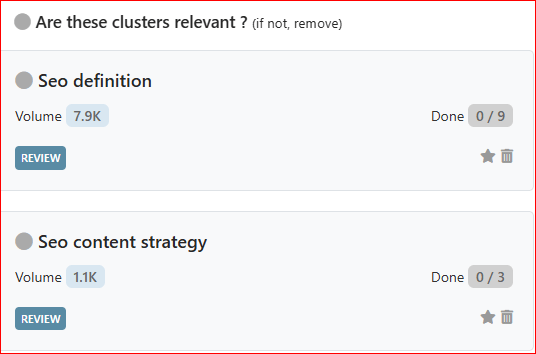
- Curate the Clusters: InLinks analyzes my site and automatically generates related content clusters. To ensure maximum ROI, I delete any irrelevant clusters that do not align with my business objectives.
Step 2: Close Pillar Page Gaps
I use the Planner’s gap analysis to identify missing pillar pages.
- Identify the Gaps: I focus on the category: Clusters that need a pillar page. This highlights topics where I have supporting content but lack a single, authoritative hub page.

- Associate or Create: I select the cluster and click “Associate.” If the page exists, I paste its URL. If the page is missing, I use the tool to generate a content brief for the new pillar page.
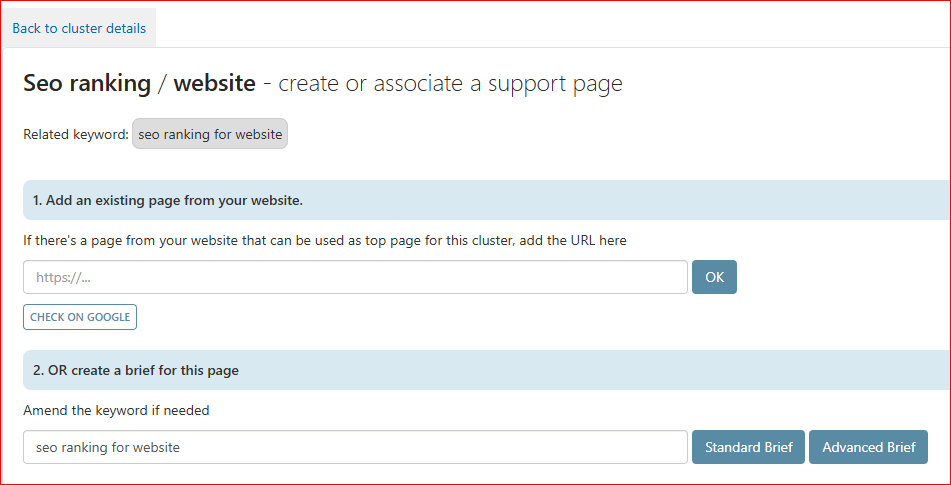
Step 3: Build Out Supporting Content (Cluster Pages)
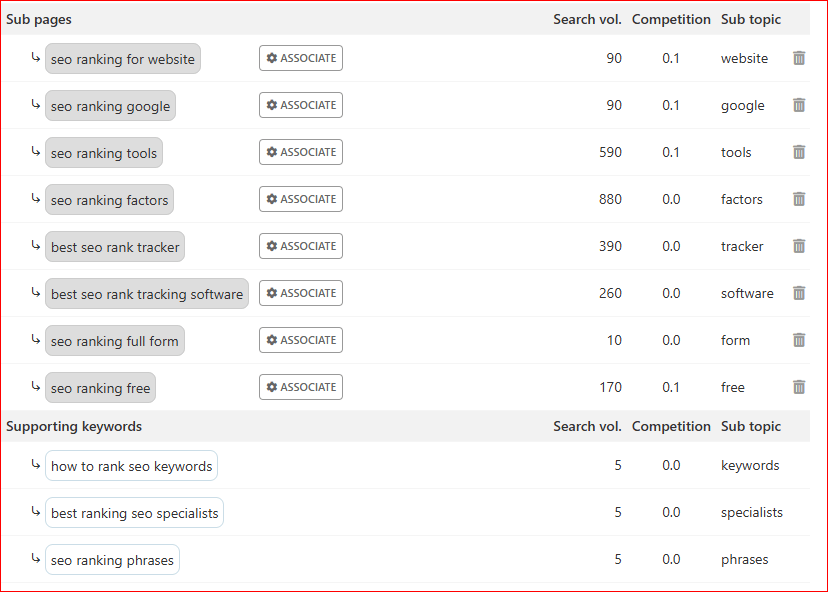
- Work the Cluster: I shift my focus to: Clusters that need supporting pages. This indicates clusters that have a pillar page but require additional sub-pages or articles.
- Prioritize Action: I use the Content Priorities tab. InLinks ranks required pages from P1 (Highest Priority) to P5. I focus my resources on the P1 tasks first.

- Associate or Create: For each required subtopic, I either associate an existing URL or create a new content brief to commission the missing content.
Step 4: Automate Internal Linking and Schema Markup
This is the most significant tactical advantage, eliminating manual linking effort once the cluster is completed.
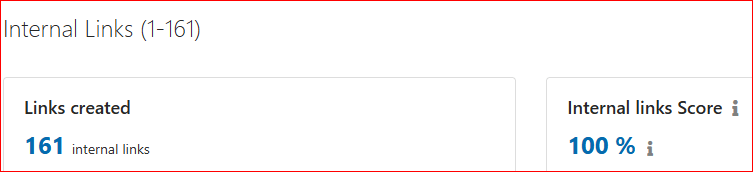
- Zero-Effort Internal Linking: Once an entire cluster is associated, InLinks automatically generates contextual internal links between them using its JavaScript code.
- Entity Connections: The system also deploys schema markup across the cluster, explicitly describing how your content entities relate to one another. Treat this as entity clarification rather than a ranking or citation lever — accurate markup makes your structure legible, but it is not what earns the position.

A Note From Practice
While InLinks automates internal linking and schema deployment across your cluster, I always recommend a manual review pass before considering it done. Automated systems work from pattern recognition — they can occasionally link entities in ways that are technically correct but contextually off for your specific page or audience. Check that each auto-generated internal link uses anchor text that feels natural in context, and verify that schema markup accurately reflects the actual content on each page rather than a generalized entity definition. Markup that describes content the page doesn’t contain reduces trust rather than building it. Automation accelerates the process significantly; human judgment is still what makes it accurate.
How Do You Create a Pillar Page?
Creating a pillar page requires four foundational steps: selecting your pillar keyword and mapping cluster subtopics from real query data, researching existing content to identify gaps, building a comprehensive outline that covers every major angle, and writing with answer-first structure so each section leads with a direct, quotable response.
Before jumping into automation tools, I execute these fundamental steps:
- Pillar and Cluster Keywords: Think of your main topic as the trunk of a tree and the related subtopics as the branches. The pillar keyword is the broad, high-level term that serves as the foundation. The cluster keywords are the specific subtopics that support it. On a new site with no search history, source those from long-tail intent research — tools like AnswerThePublic surface the questions and worries behind a topic before you have any traffic of your own. On an established site, mine your Search Console query data for impressions without clicks. On a site that started new and grew, you do both in sequence, which is the more common reality.
- Research to Provide Real Value: Dive deep into your chosen topic, exploring existing articles and videos to see what’s available. Look for missing information or unique angles to make your page stand out from existing results.
- Plan Your Pillar Page: Treat your outline as the backbone of the pillar page — it keeps content organized and ensures a smooth flow, helping you create a comprehensive and engaging resource.
- Back Up Claims with Solid Proof: Gather research, data, or expert opinions to support your claims, and cite them with a live link. Every statistic on a pillar page should trace to a named source — unverifiable figures should be removed, not hedged.
With the foundation in place, the final step is polish — turning a well-researched draft into a search-optimized, citation-ready resource.
Pillar Page Best Practices: The Final Polish
- Add Visuals and Structural Elements: Use diagrams, screenshots, and comparison tables to make the structure legible — particularly a visual of the cluster itself, which is often the single most useful image on a pillar page.
- Optimize for Search and AI Engines: Structure H2 headings as direct questions and open every section with a standalone 40–60 word answer-first paragraph. This is the element with the strongest published support — Growth Memo found pages whose headlines directly answer the question are cited by ChatGPT 41% of the time, against 29% for loosely related headlines. Note that FAQ rich results were removed from Google Search on 7 May 2026, and two large studies found no measurable effect from schema markup on AI citation: it is the visible answer structure doing the work, not the markup. For the full breakdown, see the GEO vs SEO guide.
- Verify All Links: Double-check both internal links (to cluster pages) and external links (to cited sources) before publishing. Broken links on a pillar page undermine both user experience and crawl authority.
- Confirm It’s Being Crawled: After publishing or updating, check the last-crawl date in Search Console and request indexing. A page Googlebot hasn’t revisited cannot reflect any change you’ve made to it.
- Align with Your Broader Search Experience Strategy: A well-built pillar page isn’t just an SEO asset — it’s also a user experience decision. Making content easy to navigate, logically structured, and intent-matched is the core principle behind Search Experience Optimization (SXO), which treats ranking, engagement, and conversion as one unified goal.
Frequently Asked Questions: Pillar Pages
What is a pillar page?
A pillar page is a comprehensive, in-depth piece of content that covers a broad topic and serves as the authoritative hub of a topic cluster. It links out to cluster pages — each addressing a specific subtopic in more detail — creating a content network that builds topical authority and improves how search engines understand your site’s expertise. Pillar pages are typically long-form, covering a topic from definition through practical application.
What is an example of a pillar page?
Two worked examples appear at the top of this page. The first is a GEO content cluster on this site, where a complete guide to Generative Engine Optimization links to six cluster pages, each owning one sub-question the pillar deliberately doesn’t answer in full. The second is an e-commerce cluster for Bee Pontoons, built from zero: a bee watering station guide linking to five cluster pages that were sourced first from audience intent research, then expanded using Search Console data once impressions accumulated — including one page that went on to earn three citations in a single Google AI Overview. Both currently sit at five to six cluster pages — the small end of the working range, since published guidance generally puts effective clusters at 8–20 pages per pillar. Treat a small cluster as a position to expand from.
What does pillar page mean in SEO?
In SEO, a pillar page means the foundational content hub of a topic cluster strategy. It targets a broad, high-level keyword and links bidirectionally to cluster content pages — each targeting a related long-tail keyword. This architecture signals topical authority to Google, improves internal linking structure, and makes it easier for search engines to identify your site as a comprehensive source on a given subject.
What are the types of pillar pages?
The three main types of pillar pages are: the Ultimate Guide (a comprehensive resource covering an entire topic area, best for broad authority-building), the “What Is” definitional page (explains a core concept and links to subtopic exploration, best for educational audiences), and the “How To” instructional page (step-by-step process guide, best for action-oriented audiences ready to implement). The right format depends on the primary search intent of your target keyword.
How do you create a pillar page?
To create a pillar page: first, select your core topic and map the cluster subtopics that will support it — from Search Console query data if the site has search history, or from audience intent research if it does not. Second, research existing content to identify gaps and unique angles your page can own. Third, build a comprehensive outline covering every major facet of the topic. Fourth, write with answer-first structure — each section should open with a direct, standalone answer under a question-phrased heading. Finally, link bidirectionally to your cluster pages, confirm the page is being crawled in Search Console, and request indexing.
What are pillar page best practices?
Pillar page best practices include: targeting one broad pillar keyword while naturally integrating related secondary terms; structuring H2 headings as direct questions; opening each section with a 40–60 word answer-first paragraph; linking bidirectionally to all cluster pages; expanding the cluster as far as you can while keeping every page genuinely useful; and updating the page regularly to keep it current. The compounding effect of this structure — where each cluster page reinforces the pillar’s authority and the pillar elevates the cluster pages in return — is what makes pillar content consistently outperform standalone posts over time.
What is the difference between a pillar page and a landing page?
A pillar page and a landing page serve fundamentally different purposes. A pillar page is a long-form, educational content hub designed to build topical authority through depth and internal linking — it exists to educate, not convert. A landing page is a conversion-focused page designed to drive a specific action (sign-up, purchase, inquiry) with minimal distractions and a single clear CTA. Pillar pages belong in the top-of-funnel content layer; landing pages belong at the bottom of the funnel where purchase or sign-up intent is high.
Final Thoughts
Building a pillar page might seem like a big task, but the two examples above show it doesn’t require an enterprise content team. Both started at five or six cluster pages, each owning one real question — enough to function, and a base to expand from. Published guidance generally puts effective clusters at 8–20 pages per pillar, so treat a small working cluster as a starting position rather than a finished one.
The hardest part isn’t the writing. It’s deciding which questions genuinely deserve their own page — and the answer is usually more than you think, provided every one of them is a real question someone actually asks.
Need help building your pillar page strategy?
I work hands-on with e-commerce and DTC brands to build topic cluster architectures that establish topical authority in both traditional search and AI-generated answers — combining entity-based content planning, Search Console query analysis, and internal linking strategy into one cohesive growth framework.
