
Shopify Sidekick is Shopify’s native, free AI assistant built directly into the Shopify Admin. You interact with it through a chat interface to query your store data, draft content, and set up workflow automations. It is not the same as Shopify Magic (a separate content-generation feature), and it is not the unrelated third-party “Sidekick AI” app sold on the App Store. This guide covers what Sidekick actually does for SEO and store operations, how it differs from Shopify’s Agentic Commerce feature, and — critically — where its output should be verified rather than trusted at face value.
Sidekick and agentic commerce are two of the fastest-moving parts of Shopify’s platform right now, and most of the content ranking for them describes features without ever testing them. This guide does the opposite — it covers what these tools actually do, where their names overlap in confusing ways, and where their output should be checked rather than trusted on faith. It’s part of the broader Shopify SEO checklist, if you’re working through store fundamentals before getting to this part.
Key Takeaways
- Shopify Sidekick, Shopify Magic, and a separate third-party “Sidekick AI” app are three different things sharing overlapping names — the third-party app even ranks on the same search results page as Shopify’s own Sidekick, making the confusion real, not hypothetical.
- Sidekick’s reliability appears to vary with data complexity: a documented third-party test found it correctly read simple metrics but miscalculated a sales trend by 887% on a store with complex product variants.
- Agentic Commerce (Agentic Storefronts) is a separate feature from Sidekick — it syndicates products into AI chat platforms via the Universal Commerce Protocol, rather than assisting inside the Shopify Admin. Eligibility isn’t universal: ChatGPT and Copilot require U.S.-shipping products, while Google AI Mode and Gemini require the store itself to be U.S.-located.
- Sidekick always requires manual sign-off before changing live store settings — it proposes, you approve, which is exactly why verifying what it tells you matters.
- If you connect a third-party AI tool with write permissions to your store, you’re responsible for any changes it makes — Shopify doesn’t review or approve those actions on your behalf.
- Product schema remains genuinely valuable for classic Search rich results; no evidence currently supports schema as a lever for Agentic Storefronts placement specifically.
- What Is Shopify Sidekick (and What It Is Not)?
- What Does Shopify Sidekick Do for SEO and Store Operations?
- What Is Shopify Agentic Commerce, and How Does It Differ From Sidekick?
- What Should You Verify Before Trusting Sidekick's Output?
- How Do You Set Up and Audit Sidekick and Agentic Storefronts Safely?
- Frequently Asked Questions
What Is Shopify Sidekick (and What It Is Not)?
Shopify Sidekick is a free, native AI assistant inside the Shopify Admin, accessed through a chat interface. It helps merchants query store data, draft product and marketing copy, and build automation rules. It is distinct from Shopify Magic and from a separately named third-party app. Understanding those three distinctions first prevents a common and genuine source of confusion.
Because the naming overlaps badly, let me draw the lines clearly before anything else:
- Shopify Sidekick — the subject of this guide. Shopify’s own, free AI assistant embedded in the Admin. It answers questions about your store, drafts content, and helps configure Shopify Flow automations.
- Shopify Magic — a different native Shopify AI feature, focused specifically on content generation: product descriptions, email drafts, and marketing text. It is related to Sidekick in that both are Shopify AI tools, but it is not the same feature and the two are not interchangeable.
- “Sidekick AI” (the app) — an unrelated, separate paid app listed on the Shopify App Store (apps.shopify.com/sidekick-ai) at roughly $99.99/month, functioning as a customer-service AI agent. It is not Shopify’s Sidekick and is not affiliated with it.
This last distinction matters more than it might sound. When you search “shopify sidekick,” that third-party app currently appears organically on the same results page as Shopify’s own product. A merchant — or an AI answer engine summarizing the results — can easily conflate the two. If someone tells you Sidekick costs $99.99 a month, they are describing the app, not Shopify’s built-in assistant, which is free.

One more technical detail worth knowing: per Sidekick’s own description of itself, it runs on Anthropic’s and OpenAI’s generative AI services. That’s not a criticism or an endorsement — just a fact worth having if you’re assessing what’s actually processing your store’s data when you use it.
What Does Shopify Sidekick Do for SEO and Store Operations?
Shopify Sidekick supports three practical workflows: querying store data using ShopifyQL, drafting content such as product descriptions and marketing copy, and helping configure workflow automations through Shopify Flow. It always requires your manual sign-off before saving changes to live store settings — it does not act autonomously without approval, which keeps a human in the loop by design.
In day-to-day store work, those capabilities map onto real tasks. I’ve used Sidekick myself on the Trimyxs site — it helped with some theme design tweaks and saved real time there, and it’s been genuinely useful for updating product copy. That’s my own experience specifically; as you’ll see in the verification section below, a documented third-party test found theme customization one of the less reliable areas overall. Both things can be true — a tool that works well for one person’s specific theme and task can behave differently on someone else’s, which is exactly why the verification habit later in this guide matters regardless of your own early impressions.
Beyond that, here’s what the three capabilities look like in practice:
- Data queries. Sidekick uses ShopifyQL to pull answers from your store data — for example, surfacing performance figures without you writing a report manually. This is where its behavior becomes something you need to think about carefully, which I cover in the verification section below.
- Content drafting. It can draft product descriptions and marketing copy. From an SEO standpoint this is a starting point, not a finished asset — AI-drafted product copy still needs a human pass for accuracy, keyword relevance, and brand voice before it earns a place on a page you want to rank.
- Workflow automation. It can help you construct Shopify Flow rules, lowering the barrier to setting up automations you might otherwise skip.
Sidekick’s own description of itself lists a couple of additional capabilities worth knowing about, though these are self-reported rather than independently tested the way the verification section below covers: it states it can generate or edit product images (background removal, banners, hero images) and build custom apps using AI-generated code. I haven’t tested either myself, so I’m passing these along as what the product claims, not as verified functionality.
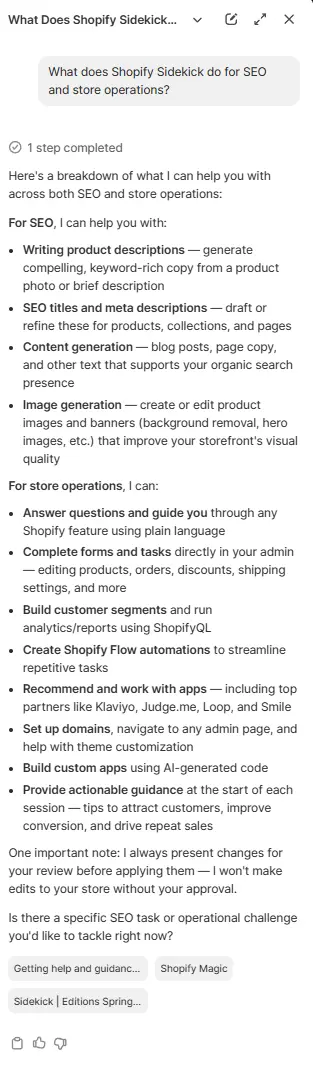
The design detail I want to underline: Sidekick requires manual sign-off before it writes changes to your live store. It proposes; you approve. That is a genuinely sensible guardrail, and it is also why the accuracy of what Sidekick tells you matters so much — you are the checkpoint, so the quality of your decision depends on the quality of its information.
What Is Shopify Agentic Commerce, and How Does It Differ From Sidekick?
Shopify Agentic Commerce — delivered through Agentic Storefronts — lets merchants syndicate their products directly into AI chat platforms like ChatGPT, Google AI Mode, Gemini, and Microsoft Copilot using the Universal Commerce Protocol (UCP). It enables product discovery and purchase inside an AI conversation, without the merchant’s own storefront as the entry point. It is a separate feature from Sidekick.
This is the distinction people most often blur, so let me be precise. Sidekick is an admin assistant — a tool you use privately, inside your Shopify Admin, to run your store. Agentic Storefronts is a product-syndication and discovery mechanism — it pushes your product data outward, into AI platforms where shoppers are asking questions. Both belong to Shopify’s wider AI product line, but they do fundamentally different jobs. One helps you operate; the other helps you get found.
The SEO implication of Agentic Storefronts is straightforward and it connects directly to the rest of this cluster. If an AI platform is going to represent your product accurately inside a conversation, the underlying product data needs to be complete and correct: titles, variants, prices, availability, and descriptions. This is a data-completeness requirement first and foremost.
Where structured data fits: for classic Google Search, Product schema remains genuinely valuable — it can earn rich results showing price, availability, and review stars in the standard search listing. That is a real, documented benefit in classic Search. I want to be careful, though, not to overstate its role in the agentic context. No source I’ve seen demonstrates that any schema type independently drives Agentic Storefronts placement or AI-agent discovery. So the honest framing is this: get your Product schema right because it earns rich results in classic Search and because clean, complete product data is what any downstream system — agentic or otherwise — relies on. Do not believe anyone who tells you a particular schema markup is a switch that “unlocks” AI-agent visibility; the evidence for that claim does not exist.
Eligibility isn’t universal, and it’s worth checking before you assume your store qualifies. Per Shopify’s own guidance: ChatGPT and Microsoft Copilot require your products to ship to U.S. customers. Google AI Mode and Gemini go further — they additionally require your store itself to be located in the U.S., not just shipping there. If your store doesn’t meet these criteria for a given channel, that channel simply won’t be available to you regardless of how well your product data is structured.
What Should You Verify Before Trusting Sidekick’s Output?
Sidekick’s reliability appears to vary with data complexity. A documented test by the German agency Tante-E GmbH found that in a store with complex product structures, Sidekick miscalculated a sales trend as an 887% increase when the actual trend was declining. The same test found it read simple metrics correctly. This is one test, on one store type — not a general verdict.
Here is the finding no competitor ranking for “shopify sidekick” currently covers, because Shopify’s own pages cannot publish criticism of their own product and ecosystem partners have little incentive to. Tante-E GmbH, a German agency, ran a documented test of Sidekick and reported three things worth knowing:
- In a store with complex product structures, including product variants, Sidekick reported a sales trend as an 887% increase when the actual underlying trend was declining. That is not a rounding error; it is a directionally wrong answer.
- In the same test, Sidekick reliably read simple metrics correctly — Conversion Rate and Average Order Value were read accurately from Shopify Analytics.
- It also generated a working, directly-callable Shopify Analytics link, which is a genuinely useful capability.
I want to be scrupulous about what this does and does not tell us, because misreading it would be its own error. This is one test, from one named source, on one store with complex product variants. It is not evidence that Sidekick is unreliable in general, and it says nothing about any store other than the one tested. What it does suggest — and what squares with how these tools tend to behave — is that Sidekick’s accuracy appears to vary with the complexity of the data it’s reasoning over. Simple, single-dimension metrics came back clean. A trend calculation across a variant-heavy structure did not.
The practical takeaway is not “don’t use Sidekick.” It is: when Sidekick returns a number you’re about to act on — especially a trend, a growth figure, or anything computed across complex product structures — verify it against the raw Shopify Analytics report before you make a decision on it. The manual sign-off design puts you in the checkpoint seat; use that position. For simple metric lookups, the risk is lower. For anything you’d put in a report or use to justify a spend, confirm it at the source.
How Do You Set Up and Audit Sidekick and Agentic Storefronts Safely?
A safe setup starts with confirming which tool you’re actually using, keeping a human in the verification loop for any Sidekick data output, and treating product-data completeness as the foundation for Agentic Storefronts. The checklist below covers the specific checks I’d run before relying on either feature in a live store.
Here is the practical checklist I’d work through:

Note that this is Sidekick describing its own safety guidance — worth reading, but it’s a source with an obvious interest in sounding trustworthy, so I’ve cross-checked and expanded on it below rather than just reproducing it.
- Confirm you’re using Shopify’s Sidekick, not the third-party app. Native Sidekick lives in the Admin and is free. If you’re being billed monthly, you’re on a different product — most likely the unrelated “Sidekick AI” App Store listing.
- Never save a Sidekick-proposed change without reading it. The manual sign-off step exists for a reason — it is your accuracy checkpoint, not a formality.
- Verify any trend or growth figure at the source. Cross-check Sidekick’s computed trends against the underlying Shopify Analytics report, particularly when your catalog uses complex variants — this is exactly where the Tante-E test found a directionally wrong result.
- Treat AI-drafted content as a first draft. Review Sidekick-generated product descriptions and marketing copy for factual accuracy, keyword relevance, and brand voice before publishing.
- For Agentic Storefronts, audit product-data completeness. Confirm titles, variants, prices, availability, and descriptions are accurate and complete — this is what determines whether an AI platform can represent your products correctly.
- Don’t assume disabling a channel is instant. If you turn off Shopify Catalog access for a specific AI partner, expect it to take up to 7 days for data sharing to fully stop. Don’t treat the toggle as an immediate kill switch — plan around the delay if timing matters.
- Know what you’re liable for with third-party AI tools. If you connect an external AI tool (not Shopify’s own Sidekick or agentic channels) that has write permissions to your store, you’re responsible for any changes it makes. Shopify doesn’t review or approve those actions on your behalf. Confirm exactly what permissions you’re granting, and whether the tool asks for confirmation before making changes, before connecting anything.
- Get Product schema right for classic Search. Well-formed Product schema earns price, availability, and review-star rich results in standard Google Search — a documented benefit worth securing regardless of the agentic angle.
- Revisit periodically, and use the Agentic home dashboard to actually check. Both features are new and changing quickly. Shopify’s Agentic home area in the Admin shows sales, traffic, and improvement guidance for connected channels — use it rather than assuming a setting you configured months ago is still working the way you expect.
Want your Shopify store’s technical SEO audited?
I run technical SEO and GEO/AEO audits on e-commerce stores — covering everything from crawlability and schema to how your store’s data holds up when AI tools query it.
Frequently Asked Questions
What is Shopify Sidekick?
Shopify Sidekick is Shopify’s native, free AI assistant built into the Shopify Admin. You use it through a chat interface to query your store data with ShopifyQL, draft content such as product descriptions and marketing copy, and help configure workflow automations through Shopify Flow. It always requires your manual sign-off before saving changes to your live store, so it does not act autonomously without your approval.
Is Shopify Sidekick the same as Shopify Magic?
No. They are two different native Shopify AI features. Sidekick is a broad admin assistant for data queries, content drafting, and automation. Shopify Magic is focused specifically on content generation — product descriptions, email drafts, and marketing text. They are related as parts of Shopify’s AI product line, but they are not interchangeable and should not be described as the same tool.
Is Shopify Sidekick free?
Yes — Shopify’s native Sidekick is free and built into the Shopify Admin. If you are being charged a monthly fee, you are likely using a different product: an unrelated third-party App Store app also named “Sidekick AI” (around $99.99/month), which is a customer-service AI agent, not Shopify’s own assistant.
What is Shopify Agentic Commerce?
Shopify Agentic Commerce, delivered through Agentic Storefronts, lets merchants syndicate their products directly into AI chat platforms such as ChatGPT, Google AI Mode, Gemini, and Microsoft Copilot using the Universal Commerce Protocol (UCP). It enables shoppers to discover and buy products inside an AI conversation without visiting the merchant’s own storefront first. It is a separate feature from Sidekick — Sidekick is an admin assistant, while Agentic Storefronts is a product-discovery and syndication mechanism.
Can Shopify Sidekick’s data be trusted?
Sidekick’s reliability appears to vary with data complexity, so the honest answer is: verify anything you plan to act on. In one documented test by the German agency Tante-E GmbH, Sidekick miscalculated a sales trend as an 887% increase in a store with complex product variants when the real trend was declining — but the same test found it read simple metrics like Conversion Rate and Average Order Value correctly. That is one test on one store type, not a general verdict. The practical rule: cross-check any trend or growth figure against the raw Shopify Analytics report before making a decision on it.
Sidekick and Agentic Storefronts are two of the fastest-moving pieces of Shopify’s platform right now, which is exactly why they deserve a practitioner’s caution rather than a feature list. Neither operates in isolation, though — crawlability, clean product data, and page performance are the foundation both features actually depend on. For that groundwork, see the full Shopify SEO checklist.
